In action
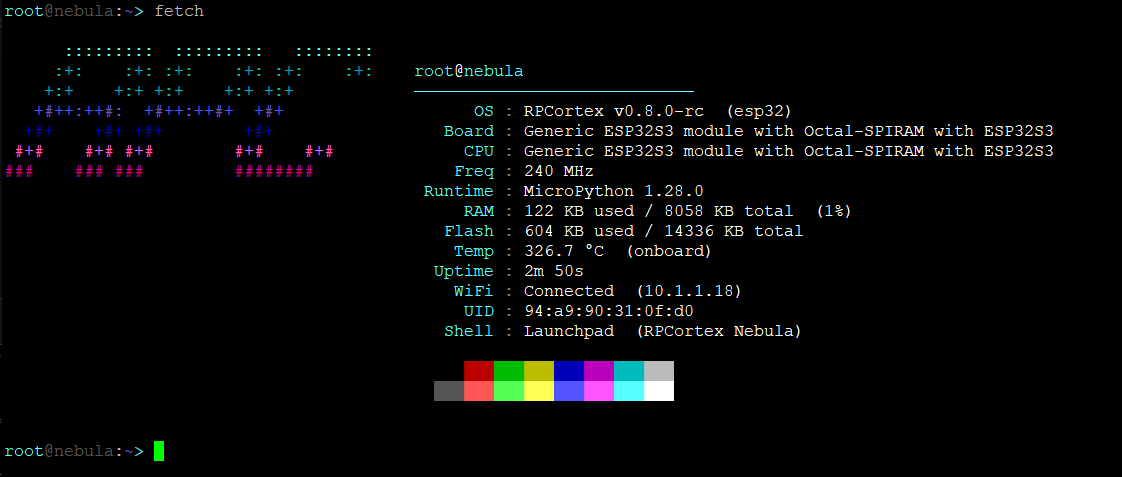
The MicroPython build — v0.9.1 “Pulsar” on a Pico 2 W, over serial at 115200 baud.
fetch — system info
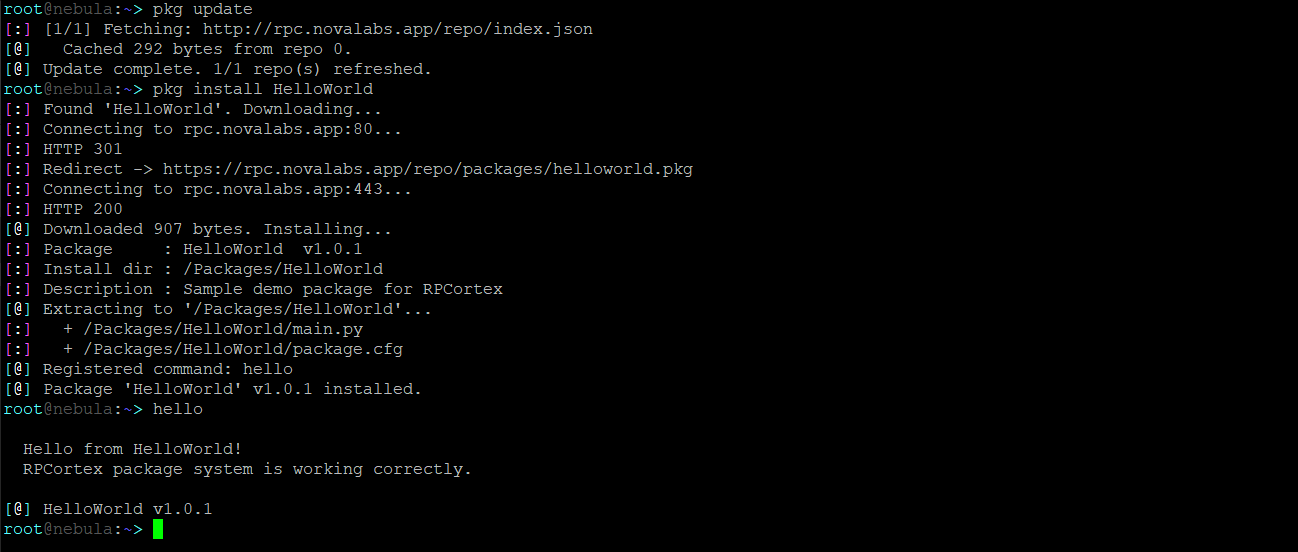
pkg — package manager
RPCortex is a full CLI operating system for the RP2 family, written in native C++. User accounts, WiFi, HTTPS, a package manager, a text editor, scripting, and a shell that genuinely multitasks across both cores. No interpreter underneath — the whole OS is one file you drag onto the board.
v1.0 “Vela” is the stable release — the MicroPython build, and the one to install if you want something finished. v2.0 “Vela II” is the C++ rewrite, and it is a beta pre-release: worth running on a spare board, not on anything you depend on. What changed, and why →
Coloured prompt, cursor navigation, history that survives a reboot, and Tab completion that adapts to case. Pipe commands (cat log | grep ERR), chain them with && / ||, redirect with >. Status lines stay on the console rather than going down the pipe.
Both cores, one task table. v1 could not touch core 1 at all — MicroPython's heap is not safe across cores — and here an unpinned task lives on core 1 about 99% of the time. ps shows pid, state, core, stack and CPU time; kill stops one.
Run commands at boot (startup) or on a timer (task), and write .rps scripts with variables, if, and while. startup add task run makes the device fully autonomous.
ls, cd, mv, cp, rm, tree, df, du, head, tail. Everything you'd expect from a real shell, including colored output and file metadata.
Salted SHA256 passwords, multi-user support, per-user home directories. Accounts are created and managed entirely from the shell.
Scan, connect, and save networks. Autoconnect on boot. Includes wget, curl, runurl, ping, and nslookup. HTTP and HTTPS supported.
Install by name from a repository, search the index, upgrade everything outdated, remove cleanly. Packages are compiled .app files that load at runtime — and on RP2350 they run unprivileged, so a bad one costs you a command rather than the device.
A full terminal text editor accessible via edit, nano, or vi. Supports find, go-to-line, cut/paste, and save. Works over any serial connection.
Every boot reports what it found and what the last run was doing if it ended badly — a log ring and a black box in memory the reset does not clear. safeboot starts with no services or packages, and three failed boots rebuild the filesystem rather than needing another computer.
An interactive settings panel accessible via settings. Toggle boot overclock, WiFi autoconnect, verbose boot, dynamic CPU clocking, and more — with arrow-key navigation. No registry editing needed.
Clock control with pulse, memory and fragmentation with meminfo, the protection unit with mpu, and what the board actually supports with compat. bench and probe install from the repository when you want numbers.
Complete command tables, shell controls, registry keys, POST details, security model, and known limitations.
docs →What changed in each release. v2.0 is the C++ rewrite: no interpreter, both cores, and packages that cannot take the device down.
Release Notes →Write a command in C, build a .app against the SDK, push it over serial, and get it listed in the repository.
| Board | Status |
|---|---|
| Raspberry Pi Pico 2 W (RP2350 + WiFi) | Recommended |
| Raspberry Pi Pico 2 (RP2350) | Supported |
| Raspberry Pi Pico W (RP2040 + WiFi) | Supported |
| Raspberry Pi Pico (RP2040) | Supported |
| ESP32-S3 and other ESP32 | v1.0 today — v2 port underway |
No firmware underneath • 2–4 MB flash • Serial terminal at 115200 baud
The RP2040 boards are back. v1.0 had to leave them on v0.9.1 because its multitasking runtime would not fit in 264 KB of RAM; without an interpreter it does. They hold 2 MB of flash against the RP2350's 4, so the firmware is built for size there and the filesystem is smaller — 384 KB on a Pico W, 1.25 MB on a Pico — with wireless, Bluetooth, TLS and over-the-air updates all still in. What they do not get is the package sandbox: ARMv6-M protection regions are power-of-two sized and aligned to their own size, so the five a package needs cost more RAM than those boards have.
The MicroPython build — v0.9.1 “Pulsar” on a Pico 2 W, over serial at 115200 baud.
A sampling of what the shell gives you out of the box. Full reference in the docs.
ls              # list with size + timestamp
tree /os        # recursive directory tree
rm -r /old      # or rm /logs/*.txt
df              # flash usage
download        # drag files on and off over USB
edit notes.txt  # nano, vi and vim open the same one
wifi connect          # interactive connect
wget http://...       # stream to flash
curl http://...       # print response
runurl http://a.py    # fetch and run
ping 8.8.8.8
nslookup example.com
fetch           # system info with the logo
meminfo         # RAM, and how fragmented it is
pulse set 250   # clock speed, now or at boot
mpu             # what the protection unit enforces
compat          # what this board actually supports
settings        # the settings panel
ps              # pid, state, core, stack, CPU
bg httpd        # run something in the background
kill 7          # stop it at its next yield
task add 60 ntp sync   # every 60 seconds
service add httpd      # started at boot, stays up
logdump         # survives a reboot
One file, dragged onto the board. No drivers, no serial
tool, nothing to install on your computer — hold BOOTSEL, plug in,
and drop the .uf2 onto the drive that appears. The board reboots by itself,
asks for a root password once, and after that updates itself over the air.
The Get page picks the right file for your board and walks through it. Installing v1.0 instead uses the browser installer, since it needs MicroPython underneath.
Packages are compiled
.app files that load at runtime and register their own commands. Install one
and it is live immediately — no reboot. On RP2350 they run unprivileged,
with the memory protection unit describing exactly what each may touch, so a package that
misbehaves costs you a command rather than the device.
pkg update               # refresh the list
pkg search web           # or bare, to list everything
pkg install httpd
pkg list                 # what is installed
pkg upgrade              # everything with a newer version
pkg remove httpd
The official repository is hosted here and configured out of the box. Browse what is in it, or write your own — a package is C compiled against the SDK, and the worked example is about twenty lines.